Model Context Protocol, commonly called MCP, is a standard way for artificial intelligence applications to connect with external tools, files, databases, and software.
It allows an AI assistant to do more than simply answer questions. With the right MCP connections, an AI application may be able to search documents, check a calendar, read company data, create tasks, or use other software tools.
Quick answer
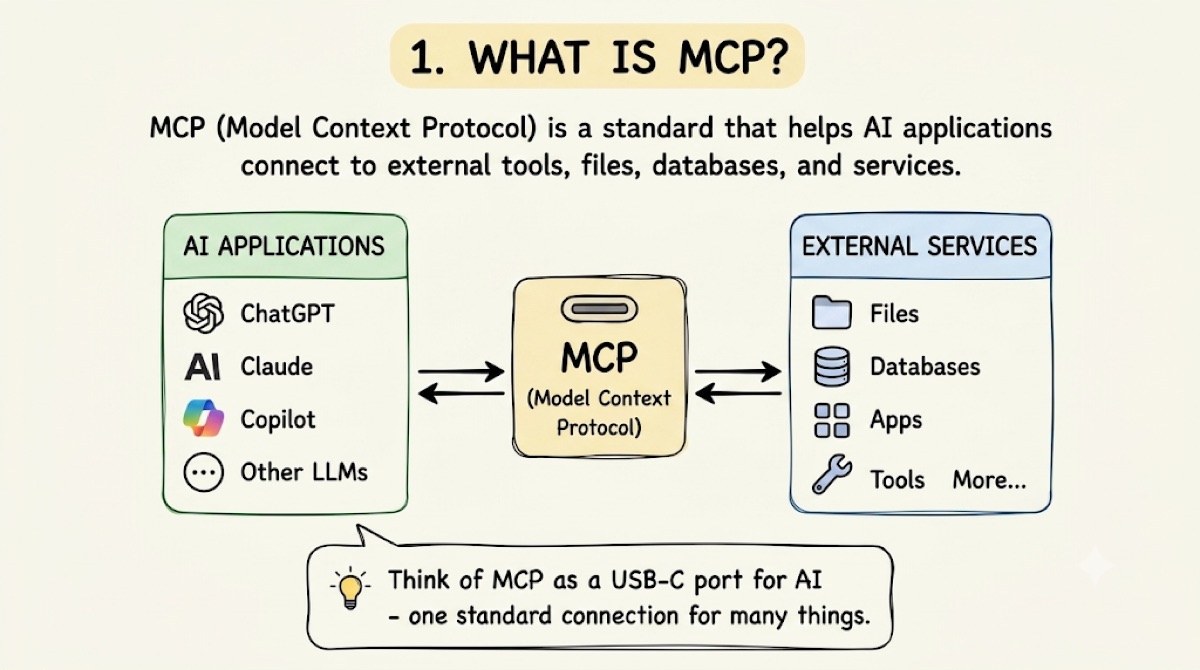
Model Context Protocol is an open standard that helps AI applications connect to external tools and information.
Instead of developers building a completely different connection for every AI application, MCP provides a shared set of communication rules.
A simple way to understand MCP is to think of it as a USB-C port for AI. USB-C allows many devices to connect through the same type of port. MCP gives AI applications a common method for connecting to different services.
What does MCP mean?
The name can be separated into three parts:
MCP is not an AI model. It does not think or generate answers by itself. Instead, it helps an AI application communicate with outside systems such as files, Google Drive, databases, calendars, GitHub, Slack, and CRM systems.
Why does AI need MCP?
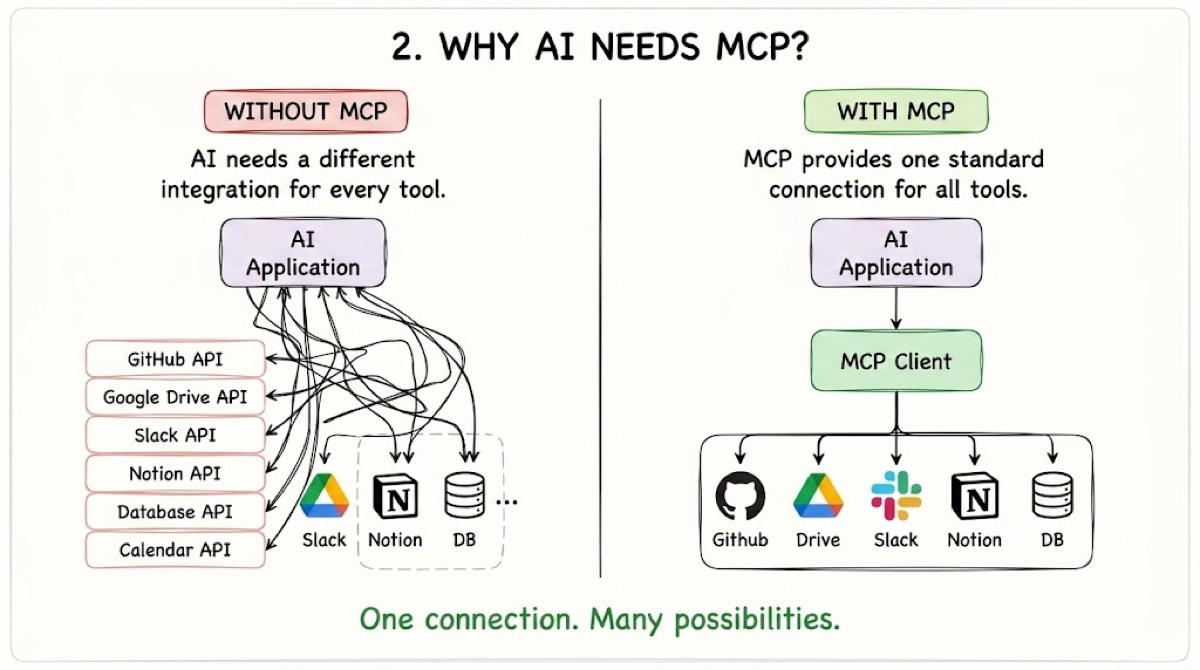
AI models are good at reading, writing, explaining, summarizing, and recognizing patterns. However, an AI model does not automatically have access to all your files, apps, and private information.
Developers can connect AI applications to services one by one, but every service may have different rules, formats, and login systems. Imagine ten electronic devices, each requiring a completely different charging cable. MCP attempts to solve a similar problem for AI applications: one common standard that different tools can follow.
You ask your teacher: “Find my science notes and tell me when the project is due.” The file system and calendar are external services, the teacher is the AI assistant, and MCP is the communication system that reaches them.
How MCP works, step by step
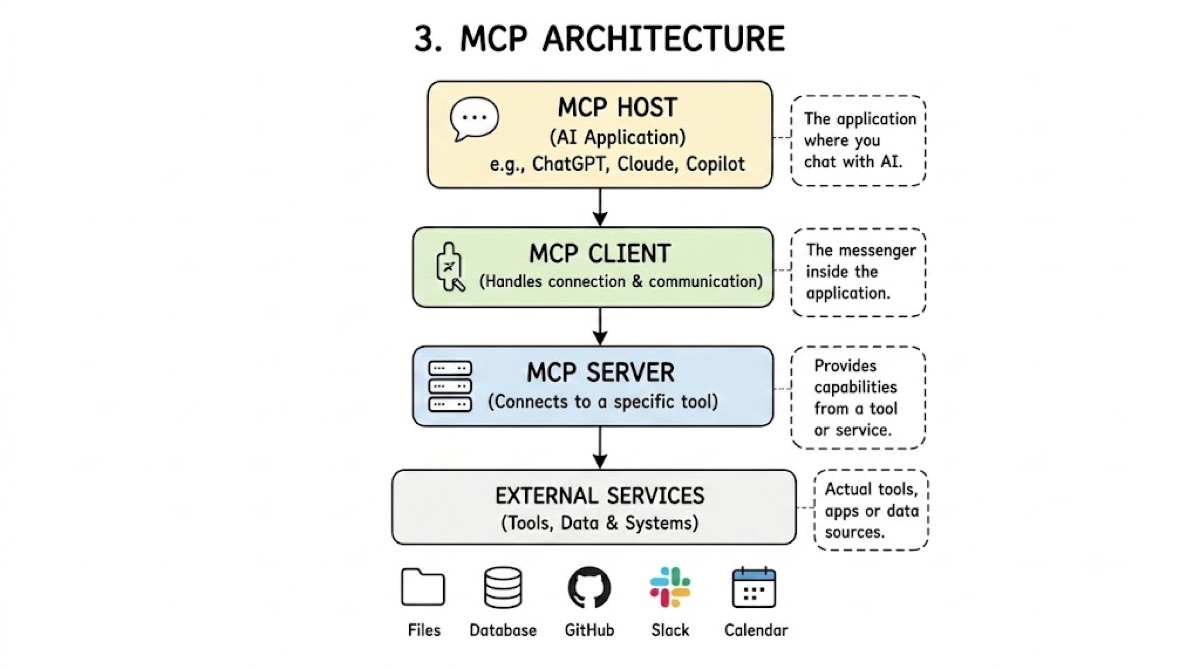
Suppose you ask an AI assistant: “Find the latest sales report and summarize it.” Here is what may happen behind the scenes.
- You make a request.The AI understands your words, but the report is not inside its current conversation.
- The AI identifies the right tool.It checks which connected tools are available and discovers one that can search company files.
- The MCP client sends a request.The request includes the action, search phrase, file type, and other required information.
- The MCP server uses the external service.It searches the connected file system and returns the relevant report.
- The AI reads the result.It now has real information instead of needing to guess.
- The AI answers you.It summarizes the report and gives you a clear response.
MCP host, client, and server
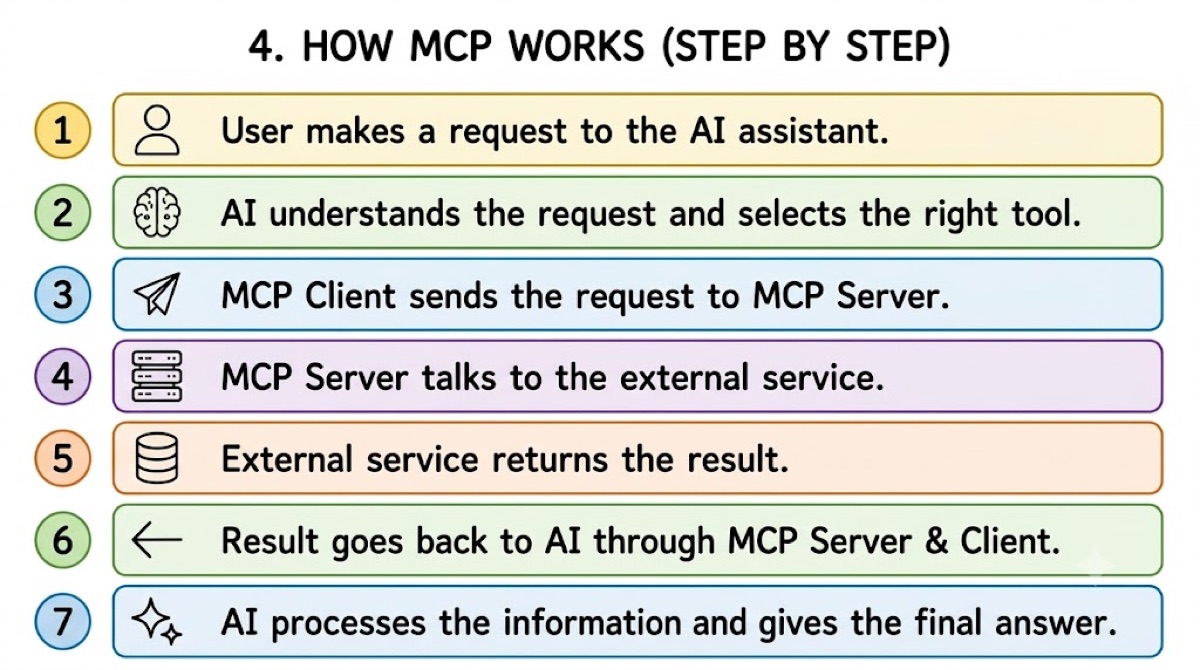
The basic MCP architecture has three important parts.
MCP host
The main AI application the user interacts with. It manages the conversation, model, permissions, and connections.
MCP client
The messenger inside the host. It connects to servers, asks what they can do, and sends and receives requests.
MCP server
A service that provides access to a specific tool or information source, such as GitHub or a database.
Tools, resources, and prompts
MCP servers can offer three main types of features:
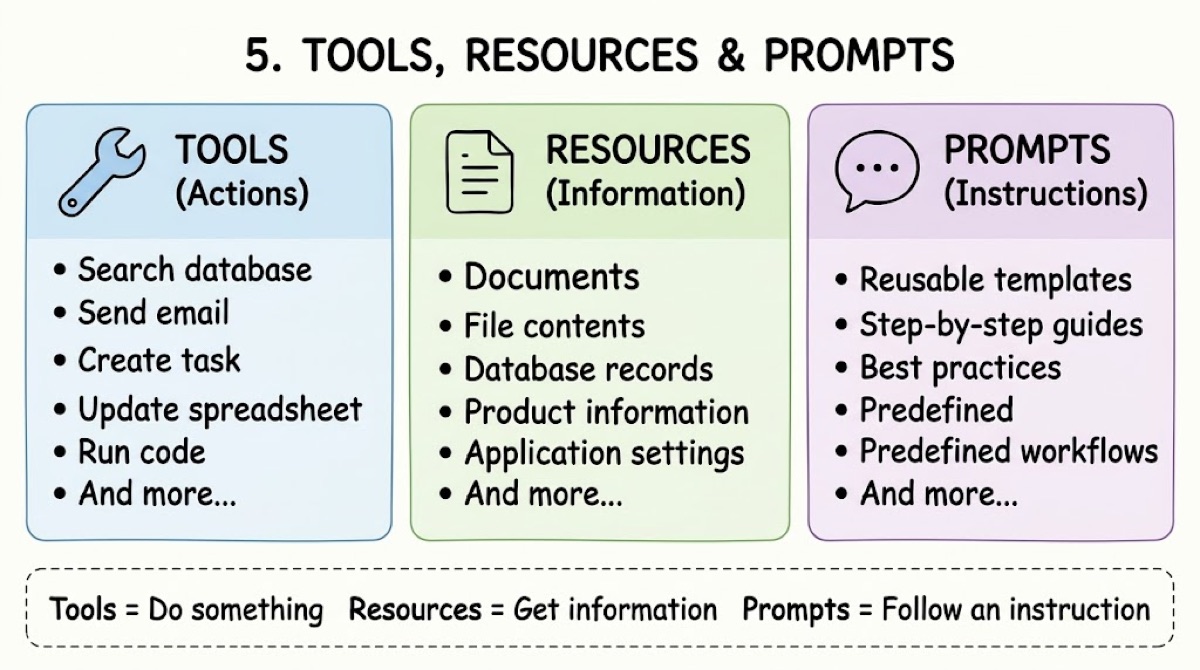
Search a database, send email, create a task, update a spreadsheet, or run code.
Documents, file contents, database records, product information, or application settings.
Reusable templates, step-by-step guides, best practices, and predefined workflows.
MCP versus an API
An API allows one software system to communicate with another. MCP is a standard designed specifically to help AI applications discover and use external tools and information.
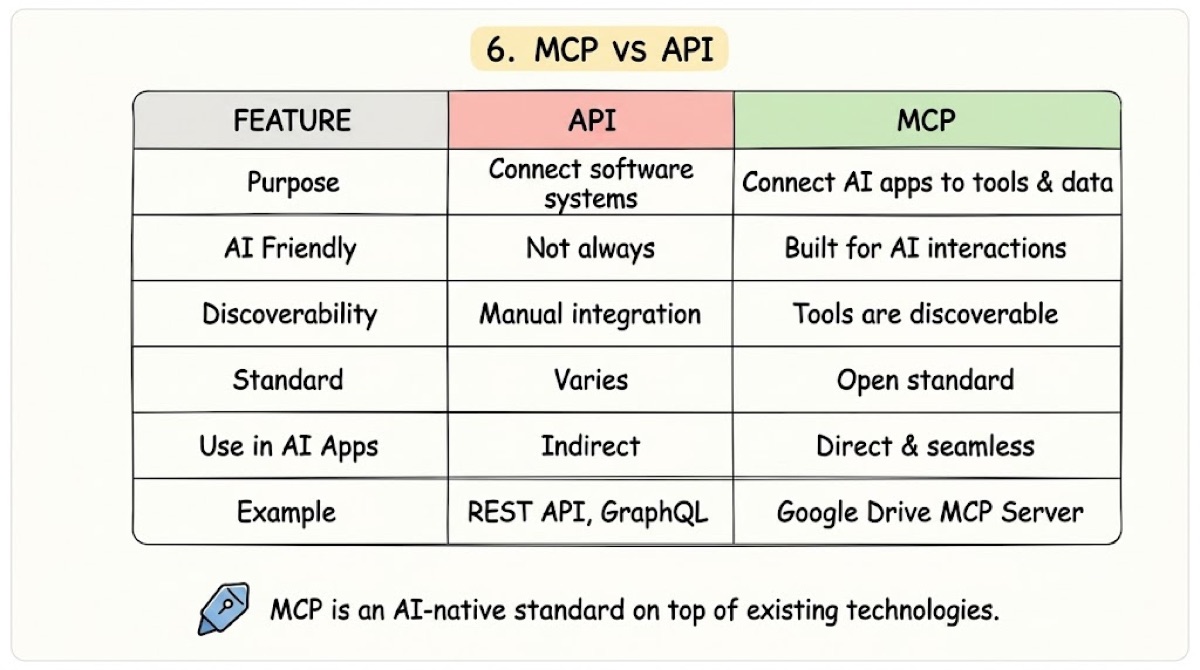
MCP does not replace APIs. An MCP server may call an app’s API behind the scenes, then return the result to the AI in a consistent format.
Is MCP safe?
MCP can provide access to important tools and private information, so security matters. Depending on its permissions, an MCP server might read files, search private databases, send messages, change records, run code, or create and delete information.
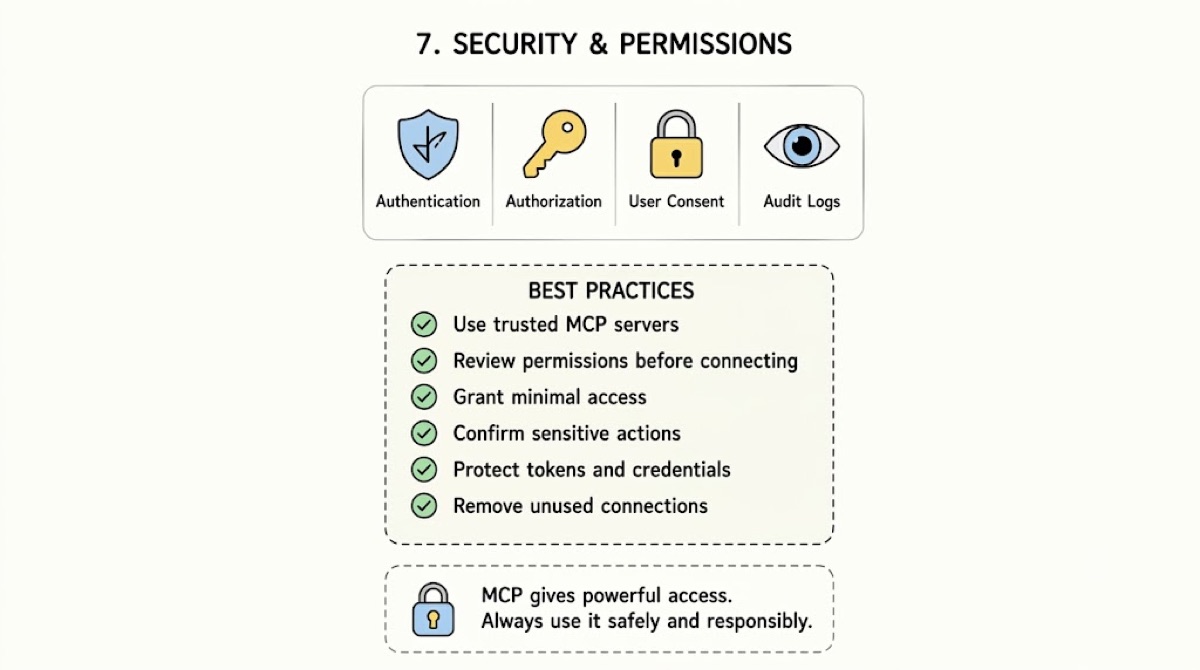
- Use servers from trusted sources.
- Review permissions before connecting.
- Give access only to necessary information.
- Use read-only access when possible.
- Require approval for important actions.
- Protect passwords and access tokens.
MCP is only a communication standard. It does not automatically make every server safe. Safety depends on the host, server, permissions, authentication, and external service.
Common misconceptions about MCP
MCP is an AI model
False. MCP does not generate answers. It helps AI applications communicate with outside systems.
MCP replaces APIs
False. MCP servers frequently use APIs behind the scenes.
Every AI automatically supports MCP
False. The AI application must support MCP and be connected to an MCP server.
MCP gives AI unlimited access
False. The AI can only access what the server and user permissions allow.
MCP servers must be online
False. An MCP server may run remotely through the internet or locally on the same computer as the AI application.
MCP makes the AI smarter
Not exactly. MCP does not change the intelligence of the AI model. It gives the AI access to more information and useful tools. A student does not automatically become smarter by entering a library. However, access to the library can help the student find better answers.
Benefits of MCP
Standard connections
AI applications can communicate with tools through a shared system.
Reusable integrations
A single MCP server may work with several compatible AI applications.
Tool discovery
AI applications can learn what tools a server provides.
Current information
AI can work with live databases, files, and applications when permission is provided.
Better organization
Hosts, clients, and servers have separate responsibilities.
More capable assistants
AI applications can move beyond conversation and perform useful work.
Limitations of MCP
Setup is required
Someone must install, configure, or build the MCP server.
Permissions can be complicated
Business applications may require login systems, API keys, administrator approval, or user roles.
Tools can be described poorly
An AI may select the wrong tool if its name and description are unclear.
Servers can create security risks
An unsafe server may expose private data or perform unwanted actions.
AI applications may differ
MCP standardizes communication, but different AI applications may still use the same tool in different ways.
Frequently asked questions
What does MCP stand for?
MCP stands for Model Context Protocol.
What is an MCP server?
An MCP server is a program that gives an AI application access to tools, files, services, or information.
Is MCP an AI model?
No. MCP is a communication standard, not an AI model.
Can MCP read files from my computer?
Yes, when a suitable local-file MCP server is installed and given permission.
Does MCP replace APIs?
No. MCP servers often use APIs to communicate with external software.
Can MCP connect to business applications?
Yes. MCP servers can connect AI applications to databases, CRMs, calendars, project-management tools, communication platforms, and other business systems.
Is MCP only for programmers?
Programmers usually build or configure MCP servers. However, regular users can benefit from MCP through AI applications with ready-made connections.
Is MCP safe?
MCP can be safe when trusted servers, limited permissions, secure authentication, and user approval are used. Unknown servers should not be given access to private information.
A real-world example
Imagine a salesperson asks: “Prepare me for today’s customer meetings.” The AI might use three MCP servers:
Meetings & linksCRM
Customer detailsDocuments
Notes & proposals
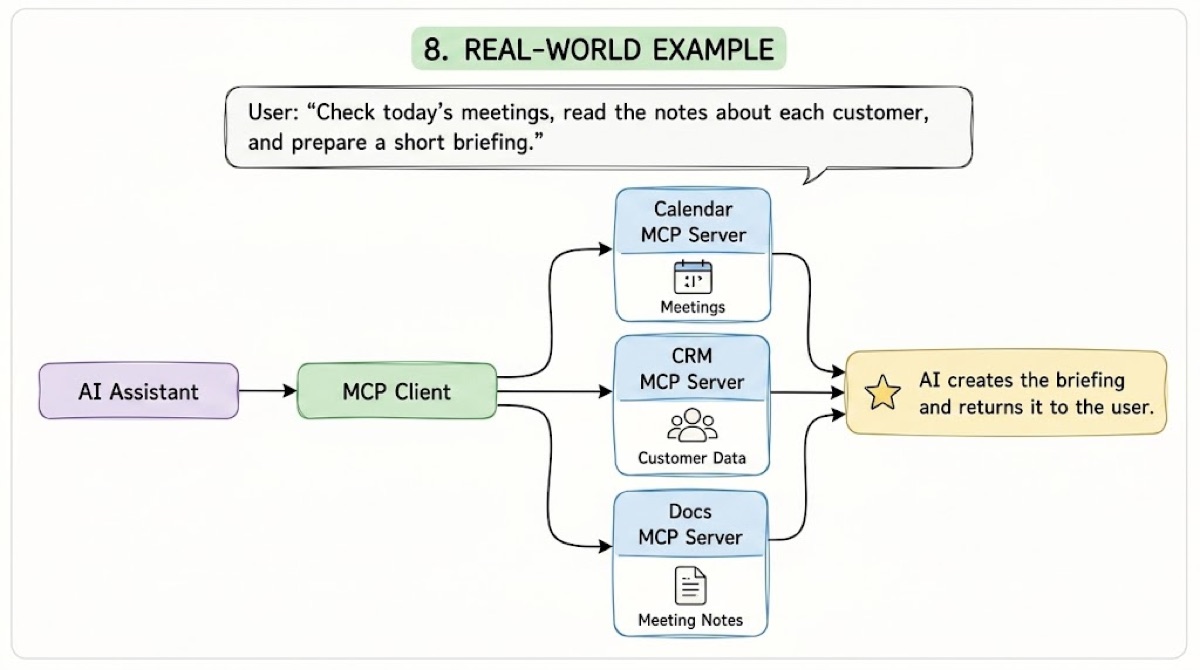
The assistant combines the information and creates one useful briefing. The user does not need to open three applications and search manually.
Final thoughts
MCP gives AI applications a standard way to connect with external tools and information.
The user makes a request, the AI understands the task, the MCP client contacts the correct server, and the server retrieves information or performs an action. The result is then returned to the AI, which explains it to the user.
The AI is the brain, external tools are the hands, and MCP is the nervous system connecting them.
That is how MCP works.